

Starting out in information technology (IT) can feel exciting, especially if you’re exploring the field for the first time or considering a career shift. With so many beginner-friendly certifications available through various organizations, it’s easier than ever to explore foundational tech skills and get a sense of where your interests might lead.
While Grand Canyon University does not offer these certifications currently, many of our technology degree programs can help you develop the skills and foundational competencies needed to confidently test for and potentially earn these certifications.

"Beginner certifications teach skills you can use right away. You learn how to set up computers, protect networks and solve common problems. They also provide a foundational knowledge that will support future learning and pathways like cloud, cybersecurity and project management. These are the same tasks many entry-level jobs ask you to do. That means you walk into your first role with skills and a validation of knowledge." — Dr. Robert Loy, Assistant Dean, Technology Division
This guide highlights several widely recognized entry-level certifications and options to help you get a clearer picture of what each one covers. If you’re new to tech or simply exploring what’s possible, this overview can help you navigate common starting points and consider which paths may align with your goals.
But first, let’s take a quick look at the impact certifications can have when entering into the tech field, elevating your qualifications or signaling to employers that you’re serious about your professional growth.
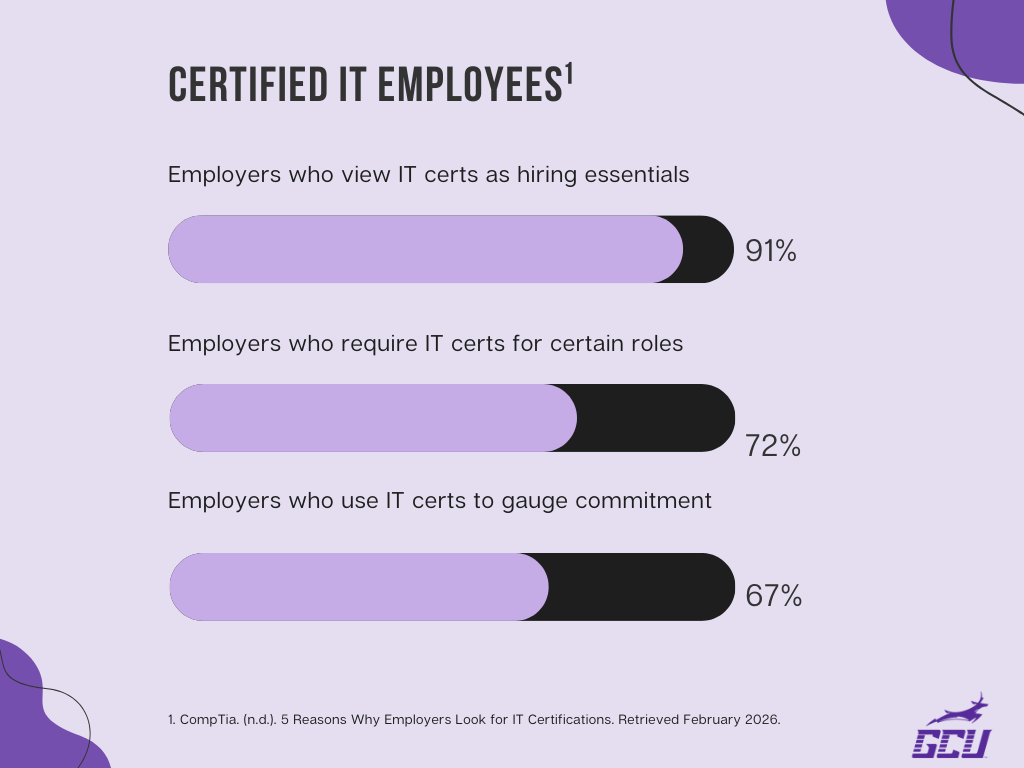
What Are IT Industry Certifications (and Why Do They Matter)?
IT industry certifications are credentials offered by independent organizations to verify knowledge in specific technology areas. They’re often designed to demonstrate practical, hands-on skills relevant to real tasks in the tech world.
Many employers use certifications as one way to gauge a candidate’s familiarity with certain tools or concepts, especially for entry-level roles where applicants may be new to the field.(See disclaimer 2) For beginners, certifications can also serve as confidence builders, offering a structured way to explore foundational IT topics and get comfortable with key concepts.(See disclaimer 3)
"It shows employers you can stick with a goal and learn what the job requires. It also reassures them that you understand the language of IT and can contribute on day one. Many students plan to earn certifications like CompTIA Network+ or AWS Cloud Foundations but never finish, so hiring managers value the effort almost as much as the success." — Dr. Robert Loy

"These certifications are created to show that you understand the needed concepts in the industry, and employers know that. They show you can do the work, not just have a vague understanding of it." — Dr. Pam Rowland, Associate Dean, Engineering and Technology
Best IT Certifications for Beginners
Beginner-friendly IT certifications offer a structured way to develop essential technical skills while helping you explore different pathways in the IT industry. These credentials are designed for newcomers, requiring little to no prior experience and focusing on foundational concepts that build confidence as you grow.
"For most beginners, the CompTIA exams for A+, Network+ and Security+ are a great first step. The content builds confidence and can be learned and practiced in a short time. Once students pass that, they may feel ready for bigger challenges." — Dr. Robert Loy
Dr. Loy explains that choosing a starting point in IT often comes down to curiosity and what genuinely interests you. “AI is a big topic right now, and there are only a handful of recognized certifications. Companies like Google offer free badging or course pathways in AI and cybersecurity, which are low entry and can help a student determine which paths might be best for them.(See disclaimer 4,5) Support, networking, cyber, cloud and project work all touch real problems in different ways. Pay attention to what feels fun,” he said.
Note: Industry certifications are offered by third-party organizations. GCU does not award these certifications currently, but related coursework and faculty instruction may help students prepare to pursue and sit for certification exams.
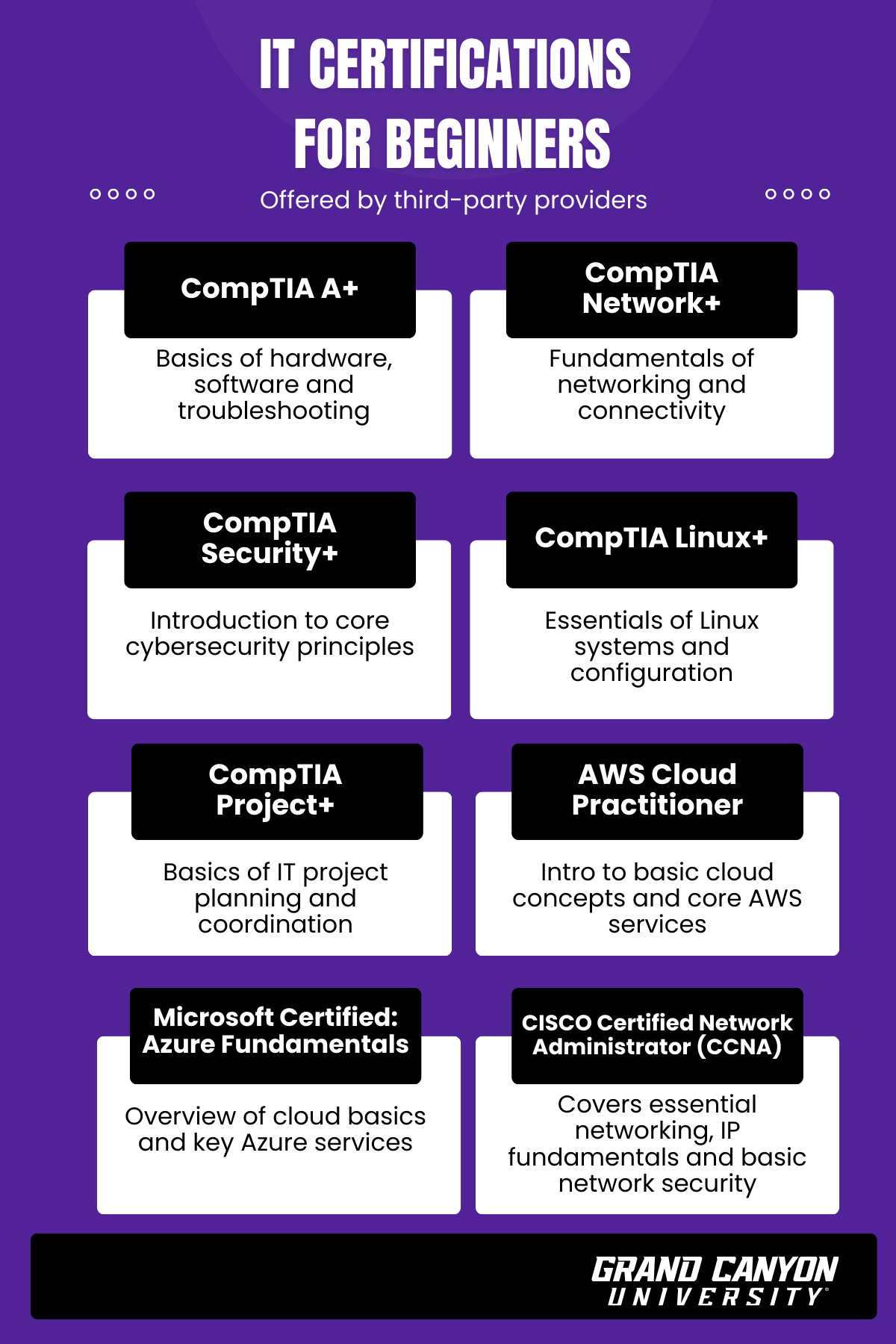
Here are widely recognized beginner certifications offered by third-party providers:(See disclaimer 6)
CompTIA A+
CompTIA A+ is widely regarded as a flexible starting point for those exploring foundational IT skills.(See disclaimer 6) It covers core areas such as hardware, operating systems, troubleshooting and customer support, giving learners exposure to essential concepts used in many entry-level tech environments.
Why earn this certification: Potential pathways associated with this certification often include roles like IT support specialist or help desk technician.(See disclaimer 6)
CompTIA Network+
CompTIA Network+ offers an introduction to networking basics — helping learners understand how devices connect, communicate and remain secure.(See disclaimer 6) Concepts such as networking models, connectivity, troubleshooting and introductory security principles are part of its focus.
Why earn this certification: Individuals interested in roles such as network technician or junior network administrator often explore certifications like Network+.(See disclaimer 6)
CompTIA Security+
Security+ provides an entry point into cybersecurity by introducing learners to risk management, threat identification and essential network security practices.(See disclaimer 6) It highlights baseline security principles that support further study or early exploration in the security field.
Why earn this certification: Roles such as security analyst or SOC analyst may list Security+ as a preferred knowledge base.(See disclaimer 6)
CompTIA Linux+
Linux+ helps beginners become familiar with Linux operating systems and open source environments. Topics include file management, user permissions, system configuration and introductory security and troubleshooting.
Why earn this certification: These concepts can support pathways such as junior Linux administrator or entry level systems administrator.(See disclaimer 6)
CompTIA Project+
Project+ is designed for individuals interested in learning the fundamentals of IT project coordination without needing advanced work history or prerequisites.(See disclaimer 7) It emphasizes project planning, documentation, communication, scheduling and risk awareness—skills relevant to collaborative technology teams.
Why earn this certification: Paths associated with this certification often include IT project coordinator or junior project manager roles.(See disclaimer 8)
AWS Cloud Practitioner
The AWS Cloud Practitioner certification gives beginners a simple introduction to how cloud computing works. It covers basic cloud ideas, AWS services, pricing models and essential security concepts, helping you build familiarity with cloud tools and terminology.
Why earn this certification: Because it provides a broad overview rather than deep technical training, this certification can help you explore early cloud-focused paths, such as cloud support associate or other entry-level roles.(See disclaimer 9)
Microsoft Certified: Azure Fundamentals
Azure Fundamentals provides an introduction to cloud computing in the Microsoft ecosystem. It focuses on cloud concepts, core Azure services, governance and identity basics.
Why earn this certification: This certification is often considered a starting point for individuals exploring Azure support roles or cloud administration pathways.(See disclaimer 10)
Cisco Certified Network Associate (CCNA)
The CCNA certification begins with core networking concepts, making it approachable for learners building foundational networking knowledge. It explores IP addressing, subnetting, network configuration, troubleshooting, network security basics and emerging topics like automation and wireless networking.
Why earn this certification: According to Uninets, nearly 140,000 companies use Cisco networking hardware and software, and 98% of Fortune 500 companies rely on Cisco technologies.(See disclaimer 11)
Understand How a Degree and Certification Work Together
A degree and certifications can complement one another by strengthening both your foundational knowledge and your technical skill set. While a degree can help you understand the “why” behind technology, certifications can help you demonstrate what you can do in practice. Together, they create a well-rounded learning path for students exploring the IT field.
How Degrees Support Certifications
A degree, such as the BS in Cybersecurity at GCU, can build core knowledge in networking, security and systems, which may help certification content feel more familiar. It provides structured learning, guided instruction and hands-on practice, giving you a stronger foundation in critical thinking and problem solving as you approach certification exams.
How Certifications Support Degrees
Certifications complement degree programs like the BS in Information Technology by reinforcing the technical skills you build through projects, internships, clubs and research. They can help you with entry-level opportunities, offering practical validation of your abilities while connecting classroom learning to real industry expectations.
Why Combining a Degree and Certifications Is a Smart Strategy
A degree can potentially support long-term growth, leadership pathways and broader career mobility. Certifications demonstrate job-ready skills and show employers you’ve engaged in hands-on practice. When paired, they highlight both depth of knowledge and practical capability — qualities many employers look for when evaluating candidates.(See disclaimer 12)
Dr. Loy explains that pairing formal education with industry certifications can help you create an advantage when entering the IT field. “A degree plus certifications can give students the best of both worlds,” he said. The degree can help you develop big picture thinking, teamwork and problem-solving skills, while certifications demonstrate specific job skills that can support hiring conversations.
According to Dr. Loy, “Together they tell a strong story to employers that says you can learn, do the work and grow.” He adds that certifications highlight personal effort, but “a career is a group or team effort, so you really need the degree pathways to be a complete employee, while the certification and proof of knowledge will open some of the doors.”
How To Choose the Right IT Certification for Your Interests
Starting out in IT can feel like stepping into a huge digital playground — exciting, but sometimes overwhelming. With so many certifications out there, it’s normal to wonder which one fits your path. The good news? You don’t need to have everything figured out. Choosing your first certification is all about learning what interests you, what feels doable and what supports your long-term goals in tech.
Here’s how to narrow it down:
How GCU Can Support Your IT Certification Path
If you’re new to tech, GCU’s degree programs introduce core IT concepts step by step, including networking, operating systems, cloud fundamentals, security basics and scripting, so you can build confidence before you ever schedule an exam.
Our IT and computing degrees prioritize foundational skills that appear across many certification objectives (e.g., troubleshooting, networking essentials, security hygiene, cloud and data concepts). While GCU does not award industry certifications, your coursework can help you prepare for third-party exams with added practice and dedicated exam prep.
"Beginners need time to click, build, break and fix things in safe lab environments. Setting up networks, working with virtual machines and solving mock problems builds confidence and removes fear. Even when exams aren’t hands-on, practicing what you learn reinforces the concepts. Some students learn best by doing, so access to labs and real keyboard time makes everything click."
Dr. Robert Loy shares that “GCU helps by lining up class topics with exam goals, covering areas like hardware and software support, TCP/IP networking, identity and access management, scripting fundamentals and introductory cloud services.” Faculty members guide you through difficult material and connect classroom content to real job tasks — support that complements the focused knowledge needed for industry exams.
“Students get support when they ask our faculty and instructors, which matters a lot when learning something new,” he said. He also notes that certification prep doesn’t have to be lonely, adding that “GCU has clubs and groups that connect like-minded students, such as our Cyber Center of Excellence, which can help you study and apply your knowledge both in the classroom and when pursuing outside certification exams.”
Whether you’re targeting IT support, junior networking, cloud fundamentals or entry-level cybersecurity, the degree you choose can give you the structured learning, faculty guidance and labs or projects that translate into exam-ready experience.
FAQs About Information Technology Certifications
This IT certification guide is your starting point — and for those who want to dig deeper into technology certifications, we’ve gathered answers to the questions students ask most often.
What is the best IT certification to have for beginners?
For many newcomers to IT, a well-rounded starting point is a certification that covers essential hardware, software, networking and troubleshooting skills. CompTIA A+ is widely viewed as one of the strongest entry-level options because it introduces the core tasks found in everyday support roles and is consistently listed among top beginner certifications.(See disclaimer 13 )If you’re drawn toward cloud or security from the start, beginner-friendly alternatives like Microsoft Azure Fundamentals (AZ 900) or CompTIA Security+ can also help you build a solid foundation aligned with those career paths.
Do I need experience before earning a certification?
Not always. Many beginner-level IT certifications are designed for learners just getting started and looking to build confidence while learning the basics.(See disclaimer 13 )If you’re in a GCU technology program, your coursework in areas like networking, systems, programming or cybersecurity can help introduce the concepts you may see on exam objectives.
Can certifications replace a degree?
Certifications and degrees serve different purposes. A degree offers broader academic and technical development with hands-on coursework and critical thinking practice. It also provides exposure to multiple areas of IT, which is emphasized throughout GCU’s technology and cybersecurity degrees. Certifications, on the other hand, show validated skills in specific tools or topics but typically don’t replace the wider foundation that a degree can support.
How long does it take to earn an IT certification?
Timelines vary by certification and study pace. Some structured programs, like the Google IT Support Professional Certificate, are designed to be completed in three to six months at your own speed.(See disclaimer 13) Many beginners can prepare for entry level exams within a few weeks or months, while more advanced certifications often require additional study or hands on experience.
Which certification should I get first?
Your first certification should match your interests and your current comfort level with technology. If you're exploring IT more broadly, vendor-neutral or fundamentals-focused certifications can be a helpful starting point, especially if your GCU classes are already teaching the underlying concepts (like networks, security basics or system management).
Once you know what area excites you most — support, networking, cybersecurity, cloud — you can choose a certification that aligns with your goals and the skills you're building in your degree program.
Are certifications different than certificates?
When exploring IT education, it’s helpful to understand the difference between academic certificates and industry certifications, as each serves a distinct purpose in your learning and career journey.
GCU certificates are shorter, credit-bearing academic programs that focus on specific areas of knowledge. They appear on your academic transcript and may be applied toward a full degree. While these certificates are not industry certifications, completing one can demonstrate focused learning and growing competency in a particular subject area, such as GCU’s UG Certificate of Completion in Cybersecurity Foundations.
IT certifications are third-party credentials earned by passing an external exam that demonstrate applied technical skills to employers. While GCU does not issue these certifications, our coursework introduces many of the concepts they cover, providing you with a strong foundation to build on with additional study. Many students use class projects, labs and faculty support to guide their preparation and decide when they feel ready to pursue an exam on their own timeline.
"The most powerful skills to thrive in IT are curiosity and commitment. With those two things, you can learn quickly and succeed in this field."
Build the Skills Behind Today’s Top IT Certifications
Beginner-friendly certifications like CompTIA A+, Microsoft Azure and AWS Cloud Practitioner can help you explore foundational areas of technology. While these exams are offered through outside providers, GCU’s STEM and technology programs introduce many of the core concepts they cover, giving you a supportive academic starting point. Whether you pursue our BS in Information Technology, BS in Cybersecurity or BS in Software Development, your degree can help you build a strong base of knowledge as you continue exploring certification options that match your goals.
Start Your Technology Certification Journey
Explore how GCU’s technology degrees can help you develop the skills that support your path toward industry-recognized technology certifications.